

AI (Artificial Intelligence) has improved rapidly, particularly in the last year or so. While the idea of AI can be a little scary, and there are certainly many ethical considerations with its use, there’s no doubt that it can be a useful and powerful tool for creators, educators, and learners.
One particularly time and money saving feature of AI is the use of text-to-speech tools. While initially a little hit-and-miss, there are now some really solid options for you to choose from, and in this article, we’ll take a look at 10 of the best voice generators for text to speech.
What is Text to Speech AI?
In case you don’t already know, I thought we’d start with a quick explanation of what it is. It’s pretty straightforward, text to speech is not new, but it wasn’t great because there’s a lot of difference and nuance in our speech patterns, which led to some pretty sketchy outputs. Now though, with AI using linguistic models to ‘learn’ and mimic those patterns and nuances more accurately, the audible results are much better – sometimes you can’t even tell the difference. If you’ve ever used the popular language learning app Duolingo, you may be surprised to learn that the characters’ voices are all created using AI text-to-speech! The result is an entirely realistic range of ages, accents, and speech patterns.
10+ Best AI Voice Generators (Text to Speech)
1. Amazon Polly
Amazon are always ahead of the curve so it should be no real surprise that they’ve created their own speech to text AI: Amazon Polly. Remember I mentioned Duolingo? They use Amazon Polly, so that’s a great example of how realistic and flexible their voice outputs are.
Amazon Polly provides an API – application programming interface – so that you can integrate it into your existing applications. You send your text, Amazon Polly converts it to speech and sends the audio directly back to your application. You’ve got a choice of languages, accents, style, pitch, and more.
Quick Look
Pricing
| Tier | Cost and What you get |
| Free | 5 million characters free each month for a year. |
| Pay as you go | Billed monthly on usage. What you're billed varies a lot depending on usage. |
Pros and Cons
| Pros | Covers dozens of languages, natural sounding voices, custom phrasing, emphasis, and intonation, integrates with many educational applications. |
| Cons | Expensive after the free trial if you’re doing large volumes of text, some have complained that voices can be robotic, difficult integration with other cloud providers. |
2. Google Cloud Text-to-Speech


If we’re starting with the ‘big hitters’ then it would be remiss not to mention Google next. Featuring 125 languages so far, and a wide range of voices, it’s certainly competitive. Its easy-to-use interface means you can adjust your results to get something of a higher quality and accuracy for your particular project or needs. Although it’s called Cloud, you can run algorithms right on your device, without a connection to the net.
Quick Look
Pricing
| Tier | Cost and What you get |
| Free | 60 minutes free per month |
| Pay as you go | Your guess is as good as ours. You’ll be charged per minute, but there’s a complicated breakdown on their site, as to exactly how that works that takes into account data logging, audio channels, length, and so on. |
Pros and Cons
| Pros | Speech on device with no internet needed, a promise of privacy. |
| Cons | Complicated pricing structure is off-putting. |
3. Speechify


Speechify is big on accessibility, plugging in to the outlets of most major brands, including Google and Apple. It promises to be able to ‘read almost anything’ seamlessly, and will read aloud emails, documents, and more.
Quick Look
Pricing
| Tier | Cost and What you get |
| Free | Trial only. Limited voices and listening. |
| Premium | $139 a year - more voices and languages. Extra features. |
| Audiobooks | $199 a year - includes more features plus actor-narrated audio books. |
Pros and Cons
| Pros | Accessibility, good customisation options, language support, sync across multiple devices. |
| Cons |
Formatting and layout can be limited. Expensive and no PAYG option yet. |
4. Microsoft Azure


Microsoft Azure is a bundle of 200 products and cloud services including text to speech. It boasts lifelike speech, customisable voices, flexible use (cloud and on premises), and more, but where it differs from some services is that once your free period of 12 months has elapsed, you can still keep using a free allowance of certain services, and only pay (via pay as you go) for going over that. In this sense it seems to be positioning itself as a competitor to Amazon Polly.
Quick Look
Pricing
| Tier | Cost and What you get |
| Free | Trial only. 12 months with $200 credit (for 30 days). |
| Pay as you go | A variety of options but still includes a free allowance. |
Pros and Cons
| Pros | A fairly long free trial and generous free credit (though you have to use it quickly!), you get to keep free monthly amounts for some services. |
| Cons | A complicated pay as you go structure which differs from speech to text, to text to speech. |
5 .Murf AI


Murf lets you make ‘studio-quality voice overs’ in minutes, which means it should also work well for podcasts, videos, and presentations. Murf guarantee that all of their AI voices sound human and you can choose a selection of them across 20 languages.
Quick Look
Pricing
| Tier | Cost and What you get |
| Free | No downloads but you get access to try all the voices (120+) and 10 minutes of voice generation. It’s more of a trial, really. |
| Basic | $19 per user per month. Access to essential features and basic voices only. |
| Pro | $26 per user per month. For high quality voice-overs. Includes soundtracks and AI voice changer. |
| Enterprise | $99 per user per month. Unlimited voice generation and storage plus things like training and onboarding support, invoicing and deletion recovery. |
Pros and Cons
| Pros | A large range of high-quality voices, in 20 languages. Music license inclusion means you can do everything right in Murf. |
| Cons | Expensive for anything but the basics. The free plan isn’t really free, it’s a very basic trial. |
How to Use Synthesia to Quickly Make Ai-Generated Training Videos
Using video is one of the most powerful ways to communicate with others. The problem is that up until now, creating videos has been very difficult, and costly. This free AI tutorial will teach you how to begin making your own AI-created training videos today.

6. ResponsiveVoice


ResponsiveVoice is a free* AI voice, text to speech generator that offers a simple and intuitive interface. It provides a selection of voices in multiple languages and creates a consistent experience across devices.
Quick Look
Pricing
| Tier | Cost and What you get |
| Free | *There is a free forever option, but you can’t use it commercially and there are limits. |
| Pro | $39 per month for all features including commercial use. |
| Enterprise | Contact for a quote. |
Pros and Cons
| Pros | Integration is easy, including with WordPress. While it doesn’t match human speech brilliantly, it can manage a good level of intelligibility and clarity meaning it could still be used on things like presentations or how-to videos. |
| Cons | Lower quality of things like pronunciation than some of the bigger hitters. Requires an internet connection and generates speech in real time which might be tricky with poor connections. |
7. iSpeech


iSpeech is a cloud-based, free text to speech AI boasting natural-sounding text to speech voice synthesis. There are 3 reading speeds and 27 languages and voices to choose from. With iSpeech, you can quickly create and download IVR (Interactive Voice Response) prompts.
Quick Look
Pricing
| Tier | Cost and What you get |
| Free | You’ll need to sign up, but this is a free AI voice text to speech, though it’s limited to 100,000 words for conversations. You can get around this by breaking up anything larger. |
Pros and Cons
| Pros | It’s a free AI voice generator, what's not to love. |
| Cons | It’s cloud-based so you’d need an internet connection to use it. Their on-site demo currently doesn't work so you'd need to register to try it out. |
8. Lovo


Lovo positions itself as the time and budget saving text to speech AI. It also claims to have the world’s largest library of voices, with over 400 to choose from, and they can express up to 25 emotions. Lovo has voices to suit corporate training and educational materials, plus voices aimed specifically at marketing videos.
Quick Look
Pricing
| Tier | Cost and What you get |
| Free | 14 day free trial of Pro with limited features. |
| Basic | $19 per month – aimed at regular content creation. |
| Pro | $24 per month (usually $48) – more hours of voice generation are included plus beta voices and extended support. |
| Pro+ | $75 per month (usually $149) – aimed at heavy users or long document conversions. |
Pros and Cons
| Pros | The basic package isn’t badly priced for light users, it has a lot of voices plus bespoke voices and emotions for specific tasks. |
| Cons | Users have reported oddities like glitching and voice deletion. Accessing more hours of voice generation is very expensive. |
9. IBM Watson Text to Speech


A cloud-based text to speech service that’s really aimed at commercial applications rather than the casual user. Watson would be used for things like answering call centre queries, or as a virtual assistant.
Quick Look
Pricing
| Tier | Cost and What you get |
| Lite | Free with 10,000 characters per month and 35 voices. |
| Standard | Pay as you go at $0.02 per thousand characters. |
| Premium and Deploy Anywhere: | Both of these mystical tiers requires contacting IBM for a quote. |
Pros and Cons
| Pros | Multilingual support, high quality output. |
| Cons | The more in-depth customisation options are a little more complicated than some competitors. PAYG means it’s a cost consideration if you’re converting anything too lengthy. |
10. eSpeak
eSpeak, a free AI voice text to speech generator, is open source and has a range of voices whose speech patterns can be customised. It can be used as a stand-alone programme or as a command-line tool. There are many languages supported, but eSpeak admits that some of these still need work.
Quick Look
Pricing
| Tier | Cost and What you get |
| Free | It's free and open source, though with limited development as yet. |
Pros and Cons
| Pros | We love a freebie. Supports several languages. |
| Cons | Still in the clunky stages so it’s not the most natural sounding. |
11. PopPop AI Text to Speech


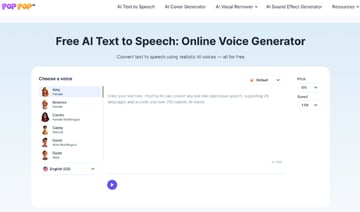
PopPop AI Text to Speech is a free AI voice generator that offers over 200 natural-sounding voices in more than 20 languages and accents. You can quickly generate speech from text without needing to create an account. Additionally, it allows you to customize the speed and pitch, and add emotion for some voices. Plus, you can export the generated speech in MP3 format for easy use or editing.
Quick Look
Pricing
| Tier | Cost and What you get |
| Free | It's free to use, but there's a limit of 10 uses per day. |
Pros and Cons
| Pros | 200+ human-like voices in 20+ languages, fast text-to-speech generation, customizable speech. The best is that it doesn’t require signup to use and export the speech in the MP3 format. |
| Cons | The maximum input is limited to 500 characters per time, which is slightly less. |
12. Podcastle (Powered by Async)
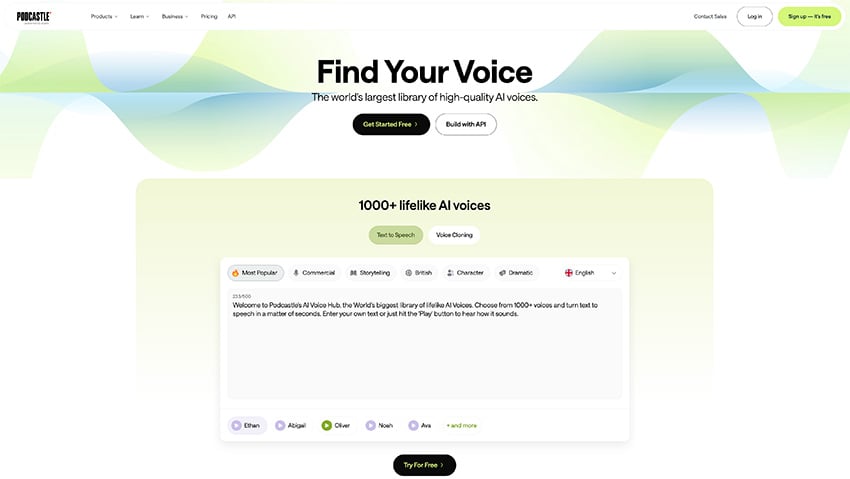

Podcastle delivers a powerful text-to-speech experience thanks to its integration with Async. This combination allows users to generate lifelike, studio-quality voices directly inside Podcastle’s editing environment, without needing separate tools or complicated setup.
With Podcastle, you can instantly turn scripts into natural-sounding narration, clone your own voice for consistent branding, or add multilingual voices to reach wider audiences. Because it’s powered by Async’s voice technology, the speech output feels realistic, expressive, and ready for professional use across podcasts, videos, and even customer-facing AI agents.
Quick Look
Pricing
| Tier | Cost and What you get |
| Free | 10K for TTS but no voice cloning available |
| Essentials | $11.99/month - TTS included with 200 minutes |
| Pro | $23.99/month - Unlimited voice cloning + advanced editing |
| Business | $39.99/month per creator - Team plan with collaboration and advanced features |
Pros and Cons
| Pros | Seamless all-in-one platform, Async-powered voice realism, great for creators who want TTS + editing in one place. |
| Cons | Best suited for creators and agencies; may lack advanced call-center features. |
Summary: Which is the best AI Voice Generator?


‘Best’ is tricky, the suitability of each AI text to speech tool really depends on the requirements of the task at hand. So with that said, to choose the right AI voice text to speech for you, you need to know what it is you want and need. Here’s a quick summary though based on some specific considerations:
1. Natural voices, language choices, customisation
Amazon Polly. Amazon have created some really powerful AI voice tools and their free monthly allowance is generous. You can see if it’s the right tool for you for a year and then switch to pay as you go if it works.
2. Cost
We’ve looked at a few free AI voice text to speech tools in this article but if pushed to choose one it would probably be ResponsiveVoice. The AI voices are a little robotic but they’ll do the job for simpler tasks.
3. Commercial Integration
IBM Watson. If you’re an established company looking to integrate AI into your systems then IBM are a safe pair of hands with a lot of tools at your disposal.
4. Everything in one Place
Murf. The licensed soundtracks give Murf the edge when it comes to creators who are looking to do everything in one place. Adding a music track means you can produce studio quality outputs really quickly and easily.
5. Everything: Free or Cheap
There’s a saying that you get what you pay for, but if you have the time and the energy, and you work across multiple projects, there’s no reason why you couldn’t flip between several of these AI voice generation tools, making use of their free trials, and free monthly allowances. Both Amazon Polly and Google Cloud Text-to-Speech offer monthly freebies.
Conclusion
As technology continues to advance, AI voice generators will likely play an even more significant role in our daily lives in areas like education, customer services, and helping to take the load from the more mundane office tasks. They’ll offer exciting new opportunities, and hopefully improve accessibility and engagement.
The integration of a natural-sounding AI voice into many platforms has already been seamless. As I mentioned in the introduction, Duolingo – who use Amazon Polly for their AI voice generation – has several characters who sound like real voice actors.
By harnessing the power of AI voice generators, educators can create inclusive and immersive learning experiences that cater to a wide range of learning styles and abilities. Businesses can use text to speech AI to create quick and easy content in the form of videos with voice over, or in use as virtual assistants.
What the future holds, none of us know, but with the recent developments in AI, and in particular with AI voice and text to speech tools, things like accuracy, range, and language availability, can only improve.
About This Page
This page was written by Marie Gardiner. Marie is a writer, author, and photographer. It was edited by Gonzalo Angulo. Gonzalo is an editor, writer and illustrator.
 By
By






