

Video editing is one of the most important tools for content creators today. Social media influencers, educators, vloggers, and even professionals on the go can all benefit from the convenience and accessibility of mobile video editing. If you edit on an iPad or iPhone, how do you choose a great editing app from the store? Let us do the heavy lifting, we’ve found ten of the best free video editing apps for iPad or iPhone for 2023. There are options for basic features if you’re a beginner, ranging to more complex editing needs.
10 Best Free Video Editing Apps for iPhone and iPad (2023)
1. iMovie - Best Free Video Editing App for iPhone and iPad


We can’t ignore the obvious and iMovie has been a staple in the Apple world for a while now, and continues to be a favourite choice for video editing. It’s user-friendly, with tools for trimming, transitions, audio adjustments, and even green-screen effects. Start from scratch by choosing your clips and then adding titles, music, and effects, or use Magic Movie and Storyboards to help you create your story. The Apple name - just like Adobe – carries a weight and trust that means it’s always going to be high on our recommendation lists… though sometimes with a hefty price tag!
Pros and Cons
|
Pros |
Seamless integration with other Apple devices. An intuitive interface that’s great for beginners. Includes a bunch of effects and creative filters that are easy to use. |
|
Cons |
Advanced features are limited. Users have complained that export features for social media accounts aren’t great. |
2. Adobe Premiere Rush - Free Video Editor for iPhone and iPad


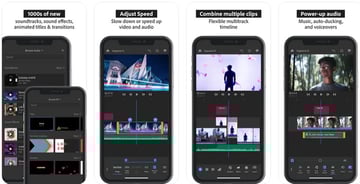
As we’ve all come to expect from Adobe, Rush has a number of professional-level features for your video editing. It includes built-in camera functionality so you can record video from the app and then start editing. There’s also an option for multi-track editing, customisable graphics, and easy sharing to your favourite social media platforms. Most edits can be made with a simple tap-and-drag motion.
Pros and Cons
|
Pros |
Robust editing capabilities. Cross device synchronisation via the Creative Cloud. The free version includes unlimited exports. |
|
Cons |
Not everything is free, so you may need to pay for more advanced options, including auto reframe. Can be overwhelming for beginners. |
3. InShot - Best Free Video Editing App for iPhone and iPad


This free video editor for iPhone and iPad has HD video editing capabilities to let you add music, transitions, text and more. InShot includes various filters, effects, and transitions, along with tools for video speed adjustment and background blur. As well as video editing, you can edit photographs too, including making collages. It’s recently updated to include a new AI powered effect: blur.
Pros and Cons
|
Pros |
Easy to use. Aimed at people creating video for social media platforms. |
|
Cons |
There are subscription options for some features. Poor choice of audio effects. Watermark on the free version. |
4. Kinemaster - Free Video Editor for iPhone and iPad
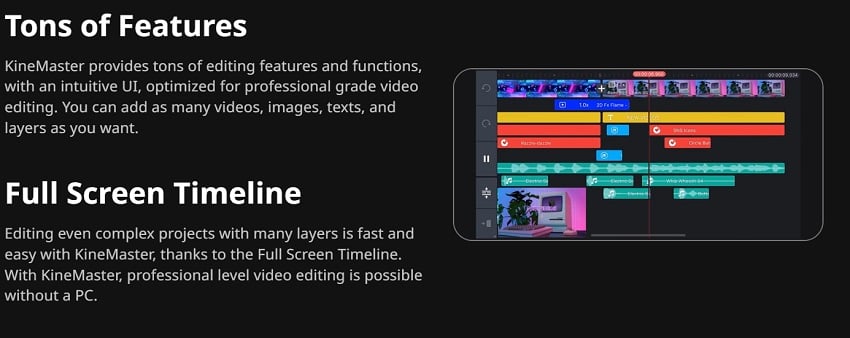


Kinemaster has a lot of options when it comes to video editing, though it’s worth noting that some of these require a subscription to access. In just a few taps you can cut videos, merge them, add effects and more. Its ever-evolving AI tools will let you do things like sharpen quality with Super Resolution, and add effects with Styles.
Pros and Cons
|
Pros |
A wide variety of tools, effects, and features. It’s continuously being updated to include new tools. |
|
Cons |
Free version includes a fairly large watermark. Some features are behind a paywall. |
5. Filmora HD - Video Editor & Maker - Best Free Video Editing App for iPhone and iPad


We always know we’re in capable hands with Filmora, and its video editing apps for iPad and iPhone are no different. This one – not to be confused with its AI app – is an easy-to-use app to help you create video stories quickly, using your video clips, music, photos and more.
Pros and Cons
|
Pros |
You can make split-screen videos. Simple to use drag and drop features. Good for beginners. |
|
Cons |
Subscription costs for some features. Watermark on free version. Users have complained of poor support. |
6. Videorama- Free Video Editing App for iPad and iPhone
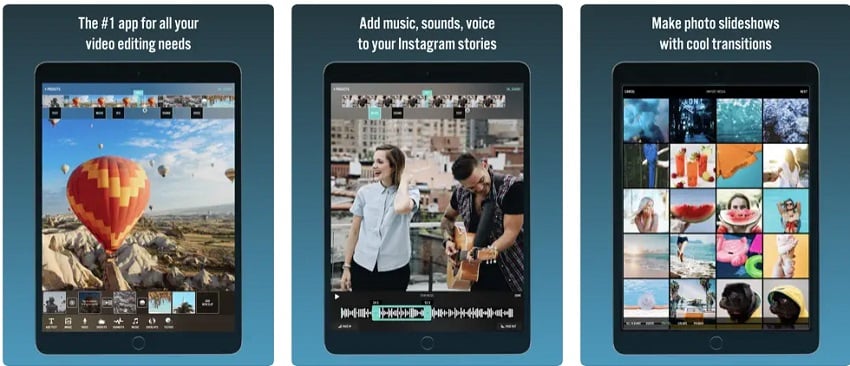


Videorama is a versatile video editing app that caters to a wide range of users, from beginners to more experienced editors. It offers a collection of creative tools and features that allow you to enhance your videos and tell your story effectively. It’s easy to animate text, add sound effects and voice-overs, and there are cinematic filters and overlays to choose from.
Pros and Cons
|
Pros |
Beginner to intermediate level tools mean it’s suitable for most video editors. |
|
Cons |
Watermark on the free version. Limited collaboration or synchronisation options. Mixed reviews from users. Some features are subscription only,. |
10 Best Free Video Editing Apps for iPhone and iPad Continued
7. Videoleap - Best Video Editing App for iPad and iPhone


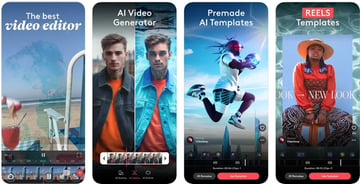
Videoleap promises ‘jaw-dropping AI overlays and filters’ as well as the usual tools you’d expect from a video editing app. Remove objects from video with AI Vanish, start from a pre-made AI template and populate it with your own content, and add presets to your video in just a couple of taps.
Pros and Cons
|
Pros |
Precise video editing. Decent audio editing tools with over 100 sound effects. Motion tracking and keyframing options. |
|
Cons |
Masking tools aren’t as good as those of Adobe products. Users complain of too many adverts and harsh limitations on the free version of the app. A little complex for beginners. |
8. VITA - Free Video Editor for iPhone and iPad


VITA is a free video editing app for iPad that also works with iPhone. Start with a premade template and add your clips for quick and simple video, or start from scratch and use VITA’s editing tools to create videos with a choice of cinematic transitions, glitch effects, filters, slow motion, and much more.
Pros and Cons
|
Pros |
Easy to use. ‘Trendy’ templates mean it fits with popular social styles. It’s really free, with no in-app purchases or subscriptions needed. |
|
Cons |
Fewer advanced editing features than some other apps. Users have complained that photos and videos are still linked to their original folders, so you need to be careful you don’t delete something you’ve used or will need. |
9. PowerDirector - Best Video Editing App for iPad and iPhone


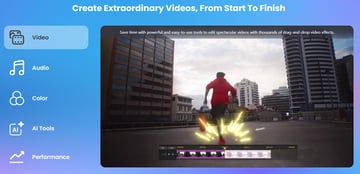
PowerDirector has some powerful editing tools like auto-generating captions, removing backgrounds from videos, motion tracking, image stabilisation, and much more. Some of these features though are only available from the premium version, so be sure to check what’s included for free. Recently added AI features include Body Effect – adding visual effects to a person – and Anime Effect – transforming your clip into an anime-style artwork.
Pros and Cons
|
Pros |
It’s quick and easy to use. Supports high quality video up to 4K. |
|
Cons |
Subscription required for some features. It’s currently quite easy to accidentally delete videos that have been used in projects, as the app doesn’t create its own folder for media items. Difficult to trim clips. |
10. Magisto - Best Free Video Editing App for iPhone and iPad


As well as premium options, Magisto has a free/basic tier where you’ll have access to the Smart Editor, can create videos up to 1 minute long, and download in 720p with a watermark. Its interface is basic but neat, making it easy and instinctive to use.
Pros and Cons
|
Pros |
It’s easy to use. The basic features might be useful to a beginner who is practising, or editors who don’t need much from their apps. |
|
Cons |
Very few features are included in the free option. The subscription tiers get very expensive for full access, with $29.99 per month at the top end. |
Summary: Best Free Video Editing App for iPad & iPhone
When it comes to video editing on your iPad or iPhone, choices have evolved significantly, offering a wide range of options for different skill levels, and editing needs. From user-friendly interfaces aimed at social media video editors, to more advanced editing capabilities for pros on the go, these apps help you to create professional videos right from your mobile devices.
It’s hard to say which apps are the best free video editing apps for iPad and iPhone, because it all depends on what exactly your needs are, but here are some suggestions that might help.
Best AI Powered App: Videoleap
Videoleap has a large choice of AI options as well as the usual video editing tools. If time saving is important to you and your video editing requires more complex and time-consuming tasks like removing objects, then this is probably the right app for you. It pitches itself at content creators and influencers to help you make on-trend videos for social channels and websites.
Best Free Video Editing App for iPad and iPhone: iMovie
iMovie stands out as the best free iPad video editor because sometimes, the obvious answers are also the best answers. While some advanced features might be missing compared to other free video editor for iPad and iPhone, its versatility and seamless integration with Apple devices make it a standout choice for a free app.
Best for Social Media: InShot
InShot is specifically designed for creating content optimised for platforms like Instagram, TikTok, and Facebook. With a variety of filters, effects, and features like speed adjustment and background blur, InShot helps you quickly create attention-grabbing videos that are tailor-made for social media sharing. InShot is a great free video editor for iPad and iPhone.
Best for Beginners: Videorama
Videorama’s simple editing interface, along with a wide selection of filters, effects, and text overlays, makes video editing accessible and enjoyable for beginners. It’s aimed specifically at newbies to video editing, and if you’ve ever used online tools like Canva, Videorama will feel very familiar and instinctive to you, without overwhelming you with too many options.
Best for Pros: PowerDirector
It was a tough call between PowerDirector and Premiere Rush, but PowerDirector pipped it on its free tools and lower subscription price for advanced tools. While Rush’s integration and Adobe name is a powerful deciding factor, we liked some of PowerDirector’s features like auto-caption generation, background removal, stabilisation and so on. Its interface looks clean and simple without tipping into cheap, and if it irons those kinks out that I mentioned earlier – the linked folder issues – then it’ll be an even better contender.
Envato Elements
If you're looking for video editing resources then you’ll be pleased to know that for a monthly subscription you can get access to thousands of templates, graphics, stock photos, music tracks and more – and use as many as you like, all with Envato Elements.


Each month you’ll find free resources too, including video templates, fonts, stock footage and more. Above, you can see some of the great freebies available this month, so why not check them out and grab yourself a bargain.
Conclusion
We hope you've discovered some of the best free video editing apps for iPad and iPhone, that will let you make a more informed choice. Whether you're a beginner looking for something that’s easy to use, a social media whizz who needs to make quick and professional content on the go, or a seasoned professional who needs something more advanced, there’s something in this list for you. Maybe even more than one!
About This Page
This page was written by Marie Gardiner. Marie is a writer, author, and photographer. It was edited by Gonzalo Angulo. Gonzalo is an editor, writer and illustrator.
 By
By






