


Welcome to our Photoshop in 60 Seconds series, in which you can learn a Photoshop skill, feature, or technique in just a minute!
Non-Destructive Photo Editing in 60 Seconds
Non-destructive photo editing is a powerful technique that lets you preserve your image's original data while still modifying it. You can even and go back and change every edit you make. Learn how to edit non-destructively in this 60 second tutorial.
Destructive Versus Non-Destructive Post-Production Workflows
In raster image editing programs like Adobe Photoshop, you can edit an image two ways: Destructively and Non-destructively. With destructive editing you overwrite the original pixel values, and can’t go back and change things later. With non-destructive editing, you use Adjustment Layers, Smart Objects and other tools and techniques to modify the image without overwriting the original data.
How to Edit Photos Non-Destructively
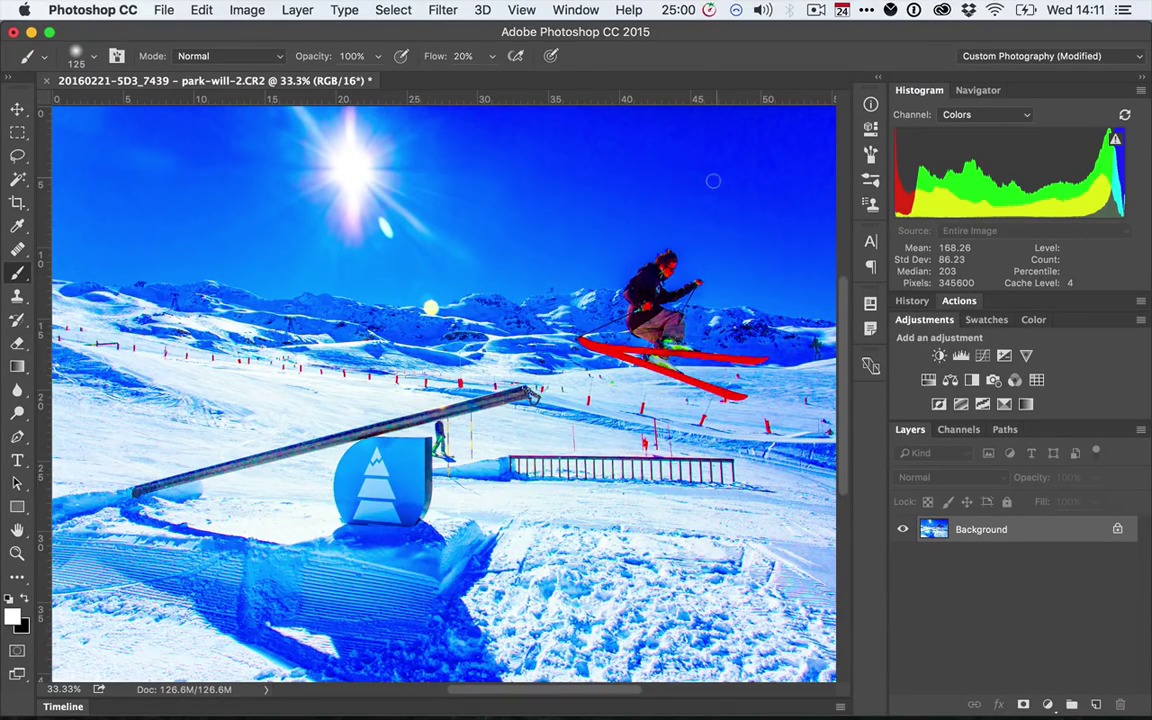
Take the image in the screencast above. One way to increase the Saturation is to select Hue/Saturation from the Adjustments menu. Push the Saturation and click OK. If we push the Saturation too far, I have to accept it, or undo it entirely. This is destructive editing. The changes are "baked in" to our image.


To make the same change non-destructively, you use a Hue/Saturation Adjustment Layer instead. Once again, increase the Saturation. This time, even if we go too far, we can double click on the Adjustment Layer and dial the effect back to a better amount.


We can even add a Layer Mask to control exactly what areas of the image are affected.


Want to see this in action? Check out the quick video above to see this lesson at work!
A Bit More Detail
Want to learn more about Adobe Photoshop's vast tools and settings? Check out these tutorials below:

 The A to Z of Adobe Photoshop


 How to Retouch Portrait Photos Using Dodge and Burn

 Using Non-Destructive Editing Techniques in Your Photoshop Workflow

 What Are Photoshop Actions and How to Install Photoshop Actions

60 Seconds!?
This is part of a series of quick video tutorials on Envato Tuts+ in which we introduce a range of subjects, all in 60 seconds—just enough to whet your appetite. Let us know in the comments what you thought of this video and what else you'd like to see explained in 60 seconds!
 By
By






