

The internet is full of online videos. That means yours has to stand out right away, even before people click “play.” How do you do that? With a compelling YouTube thumbnail!
In this tutorial, you’ll learn how to make a thumbnail for YouTube that inspires people to watch your content. With a YouTube thumbnail, you’ll draw the attention of potential viewers. And you’ll inspire them to become regular viewers of your channel. You have to get it right.
Let’s get started!
What Are Thumbnails on YouTube?
So, what are thumbnails on YouTube? And why are they important? Imagine scrolling through YouTube videos. You might be on the homepage, or you might have searched for videos on a given topic. Each one will appear with a small photo beside it. This is a YouTube thumbnail.
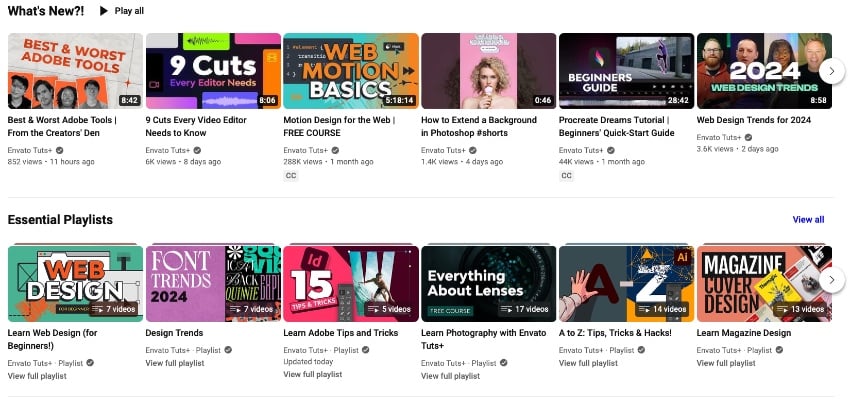

Now, consider how you choose which videos to watch. From a long list, which videos catch your eye? Odds are, you’ll play the videos with the most appealing YouTube thumbnail.
In short, video thumbnail images are how your video stands out. A great YouTube thumbnail is how you win viewers.
How Do Thumbnails Help Me?
Wondering how to make a YouTube thumbnail that helps you? The key is to be engaging. Think of the ultimate goal: inspiring users to start playing your videos, and watch them through until the end. This behavior influences how videos rank on YouTube and Google’s own Search tool.



While thumbnails aren’t directly ranked in search terms, they drive viewer behavior. And this behavior helps your videos rank higher.
An eye-catching YouTube thumbnail inspires clicks. And these clicks boost what’s called your Click-Through Rate (CTR). The Click-Through rate measures engagement. In terms of search indexing, it indicates a video that is getting a lot of attention.
What are thumbnails on YouTube? Your key to being noticed. Rankings are driven by views, traffic, and engagement. And all three of those measures can be positively influenced by eye-catching YouTube thumbnails.
How to Make a Thumbnail for YouTube That Drives Viewership (Top Tips for 2024)
Making a YouTube thumbnail is easy. When you think of how to make a YouTube thumbnail, consider your project. What is your video about? And what about this video will best inspire audiences to click “play” and watch it?
The answer will be different for every single video that you edit. But as you approach how to make a thumbnail for YouTube, keep some fundamental rules in mind. These help you always make a YouTube thumbnail that looks its very best!
1. Focus on Eye-Catching Imagery
I can’t stress this enough: you have to have an eye-catching YouTube thumbnail. Search for any common topic on YouTube and you’ll find hundreds or thousands of results. You have to stand out.


And to do that, you need a visual that grabs attention. Bright colors are key, along with compelling scenes. And don’t forget - you can add text to YouTube thumbnails too. That’s one of my favorite ways to help my videos rise above others.
2. Study Similar Content
As you think of how to make a thumbnail for YouTube, don’t just guess. Do some research before uploading and posting. How do you want audiences to find your video when you search?
Try running a search for these terms. When you do, study the thumbnails of other, high-view videos on the same themes. What are thumbnails on YouTube that work? Just look at your peers!
Never copy the work of others. But you can seek inspiration. What stands out about the thumbnails of popular videos?
When you find these details, incorporate them into your own design aesthetic. And of course, try to be even better than the rest. This way, you can position your next YouTube thumbnail video for success.
3. Lock in the Right Tech Specs
Once you’ve decided what to feature in your YouTube thumbnail, it’s time to start building. Always be sure to use the right dimensions and specifications for your thumbnail design. The last thing you want is a cropped, stretched, or distorted image.



What is the YouTube thumbnail size? On YouTube, thumbnails are sized at a 1280x720 resolution. This equates to an aspect ratio of 16:9.
You’ll also want to ensure that your YouTube thumbnail size doesn’t exceed 2 megabytes. This is the YouTube thumbnail size file limitation. YouTube currently won’t allow you to upload files larger than that.
4. Build a Winning Thumbnail Image for YouTube
Now, it’s time to see how to make a YouTube thumbnail to stun your audiences. We’ve outlined several style tips and design ideas above. Now, you can launch your favorite image editor and start building.
There is no single right way to make a YouTube thumbnail. But there are certain ways to make them more engaging. For example, try to use ample contrasts and a lot of bright colors. If you use text, make it bold and easy to read.
And remember: thumbnails are small. Never try to pack too much into a YouTube thumbnail image. When you do, you’ll have a cluttered mess that will distract your audience.
And of course, don’t forget the image itself. Ensure that it’s a relevant scene from your video, or at least, related to the featured content. Remember: you have one shot at making a great first impression. Make the most of it.
5 Frequently Asked Questions (FAQ’s) About YouTube Thumbnails
The process of creating your own video thumbnail can be daunting. It’s natural to have questions.
To help you get started, we’ve answered five common FAQ’s about YouTube thumbnails. Read through these, and you’ll be ready to approach the YouTube thumbnail design process with confidence.
1. Can I Use My Own Image for a YouTube Thumbnail?
Absolutely! Using your own images is a great way to create a YouTube thumbnail in 2024. Just be sure that they’re relevant, and that they adapt well to the YouTube thumbnail size.
By using your own image, you’ll create video thumbnails that are superior to screen captures. By nature, videos are in motion. Even stills taken from them will likely have motion blur and other visual defects. By choosing a high-resolution still image, you’ll have a higher-quality video thumbnail for YouTube.
2. What App Should I Use to Create YouTube Thumbnails?
You have several options. The easiest option is to choose a thumbnail from the video itself. You can do this after you upload your clip to YouTube. YouTube will suggest specific frames to use as a thumbnail. Or, you can choose your own.
But this isn’t often the best approach. You’ll enjoy much better results if you generate your own thumbnail image. For this, you can use any image editing app that you like. Adobe Photoshop is a popular option.
But any image editor that you enjoy using will work well. Many people even use mobile editors like VSCO or Canva to create YouTube thumbnails. Your best bet is to use an image editor or generator that you’re comfortable using. The higher your skill level, the better your thumbnails will be.
Don't forget to incorporate the YouTube thumbnail size. Choose an app that lets you set that. See more tools that can help you make YouTube thumbnails below:


3. How Can I Be Sure My YouTube Thumbnail Attracts Viewers?
Even the best YouTube thumbnail doesn’t guarantee success. But you’ve learned key ways to increase your chances of winning viewers! Imagine a video thumbnail like this: it’s a story in a single image. You need to convey to audiences - at a glance - what your video is all about. You want them to take action, and that’s what your thumbnail will drive.


4. Can I Change a YouTube Video Thumbnail Later?
Yes! This is a great way to help your videos gain more views. If your first thumbnail design doesn’t work out, don’t fret. You aren’t stuck using it forever. You can change a YouTube thumbnail after uploading. Watch your viewership metrics, and consider adjusting the thumbnail if you’re not gaining traction.
To do it, go to the YouTube Studio panel on your YouTube account. Find your video, and choose Details. Here, you can find the Thumbnail section and upload a new design. You can do this as many times as you want. It’s a wonderful way to keep videos new, fresh, and relevant!
5. Should I Maintain a Consistent Look for my Video Thumbnails?
Yes! If you’re a YouTube channel creator, YouTube thumbnails are even more important. They help you maintain a consistent look and feel for your content.
Think about channels that you enjoy watching, and scroll through their uploads. Odds are, you’ll notice a theme in their video thumbnail designs. Often, the thumbnail alone will tell casual viewers who you are.
Building a YouTube channel is fundamentally building a personal brand. It’s all about the visuals. By choosing a theme for your YouTube thumbnails, you’ll be well on the way to creating a powerful visual brand. Viewers will associate this with your work. It’s how to make a thumbnail for YouTube that makes you instantly recognizable.


Learn More About Great Video Production Techniques (To Amaze Audiences in 2024)
A YouTube thumbnail is a great way to make an amazing impression. But your videos deserve the best editing and production, too! After all, thumbnails inspire viewers to watch. But once your video is playing, you have to keep them engaged.
To help, here are some top Envato Tuts+ video tutorials. With these, you can learn new production techniques and skills to bring to all of your future projects:

 What Video Editing Software Do YouTubers Use? (Best For 2024)


 How to Edit TikTok Videos (Beginner Guide for 2024)


 How to Use Music in Premiere Pro With the Essential Sound Panel


 How to Edit Video With Flixier (Browser-Based NLE)


 How to Use Square Video (For Social Media)
The Top Source for the Best YouTube Thumbnail Templates (With Unlimited Downloads)
When you think of how to make a YouTube thumbnail, don’t imagine working alone. Instead, your best bet is to embrace premium YouTube thumbnail templates.
The best source for these templates is Envato Elements. You’ll find thousands of premium YouTube thumbnail templates to choose from. Each one is designed by visual creative experts with your needs in mind.
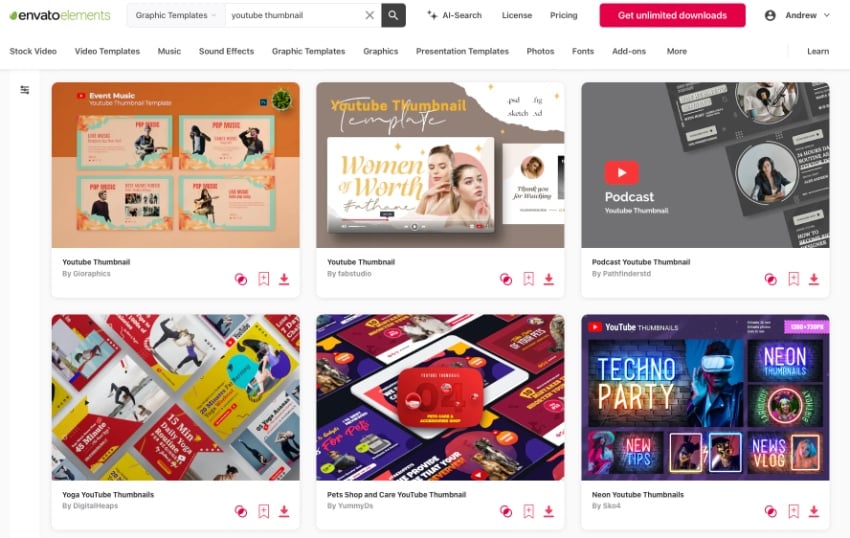

The Elements offer is powerful: unlimited downloads. Yes, that’s right. For a flat, monthly rate, you can download and use as many YouTube thumbnail templates as you want.
And that’s just the tip of the iceberg. Elements has over 17 million digital assets (and counting!) Among these are stock photos, music, fonts, and more. It’s the ultimate creative resource in 2024 and beyond.

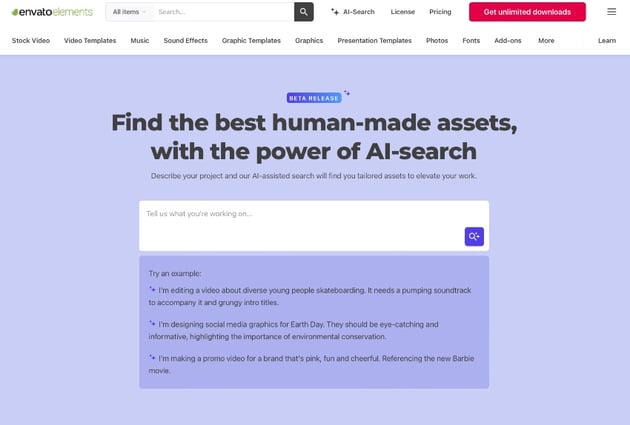

Now, Elements makes it effortless to find the perfect digital content for your next project. We’ve just launched a brand-new AI-powered search assistant. With this tool, you can outline your project’s needs and goals in a few words.
When you do, Elements will find and compile the very best content for you from our vast library. It’s the perfect way to find the ideal digital assets for any project need.
So, don’t hesitate. You can’t afford to miss out on Envato Elements. Join today and get started exploring the vast library. You’ll never look back.
Build an Amazing YouTube Thumbnail for Your Next Video Today
As you can see, YouTube and Search thumbnails are essential ways to win viewers. In essence, you get one chance to make a great impression and attract people to watch your content. So, be sure to take what you’ve learned to heart. Choose stunning, eye-catching visuals that stand out from the crowd. Study other video thumbnails and learn how to be different.
When you do, create your visuals in your favorite editing app and add them to your video. Now, your channel’s videos will truly stand out! Watch as viewership increases and audience engagement builds. Making the perfect YouTube thumbnail takes some work. But you’ll be rewarded for your efforts by your audience.
What are you waiting for? Start building a great YouTube thumbnail today! It’s the first key step to going viral with your next video.
 By
By






