
 Lessons: 30Length: 3.5 hours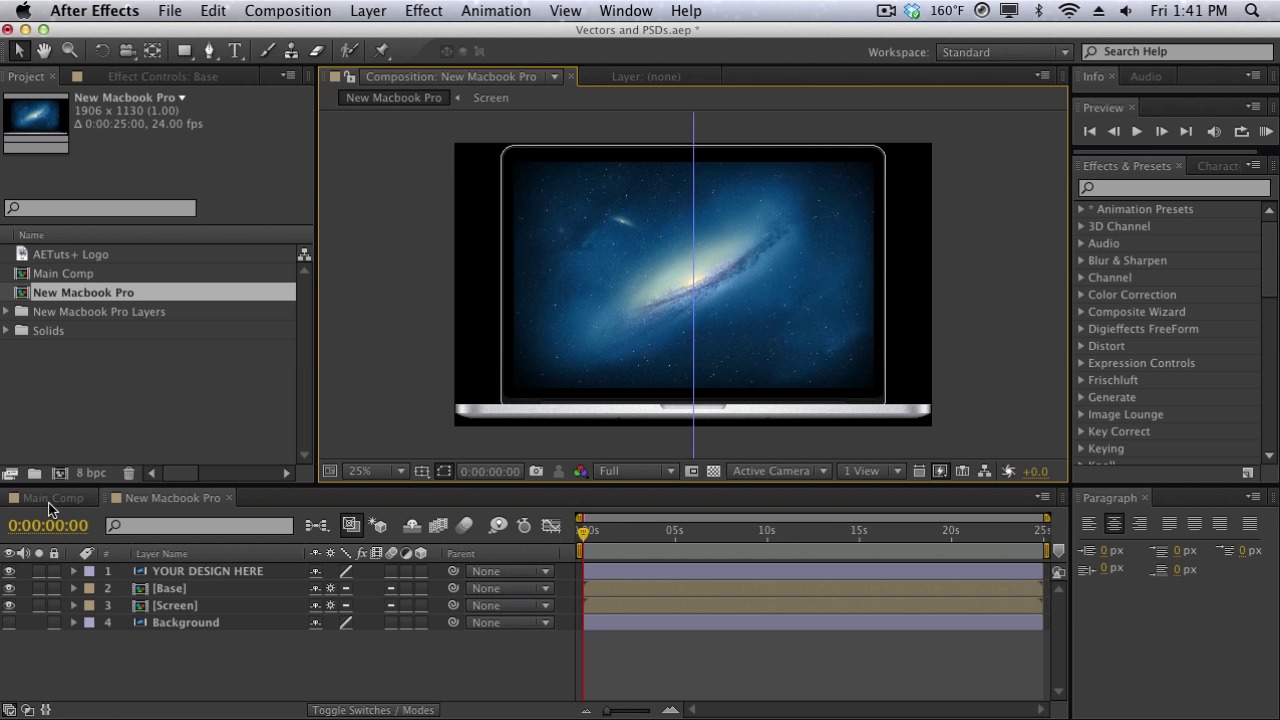
- Overview
- Transcript
3.5 Vectors & PSDs
In this lesson, we’re going to talk about how to import and use vectors and PSD layers inside After Effects. We’ll also talk about continuously rasterizing vectors.
1.Introduction
1.1Introduction of the Course & After Effects01:03
1.1
Introduction of the Course & After Effects
01:03
2.The Core Basics
2.1Exploring the Interface04:31
2.1
Exploring the Interface
04:31
2.2Workspace & Project Management06:31
2.2
Workspace & Project Management
06:31
2.3Projects vs Compositions07:23
2.3
Projects vs Compositions
07:23
2.4The Timeline09:34
2.4
The Timeline
09:34
2.5Effects05:56
2.5
Effects
05:56
2.6Presets02:13
2.6
Presets
02:13
2.7Keyframes & Animating Parameters09:35
2.7
Keyframes & Animating Parameters
09:35
2.8RAM Previews07:42
2.8
RAM Previews
07:42
2.9Rendering for Final Output07:12
2.9
Rendering for Final Output
07:12
2.10Type Tools11:59
2.10
Type Tools
11:59
2.11Masks & Shapes07:32
2.11
Masks & Shapes
07:32
2.12Adjustment Layers02:31
2.12
Adjustment Layers
02:31
2.13Basics of Expressions07:11
2.13
Basics of Expressions
07:11
2.14The Graph Editor10:48
2.14
The Graph Editor
10:48
2.15Parenting09:25
2.15
Parenting
09:25
2.163D Layers06:38
2.16
3D Layers
06:38
2.17Camera Tools06:05
2.17
Camera Tools
06:05
2.18Different Camera Views06:33
2.18
Different Camera Views
06:33
3.Basic Techniques
3.1Precomps and Why They’re Useful06:40
3.1
Precomps and Why They’re Useful
06:40
3.2Layer Maps07:57
3.2
Layer Maps
07:57
3.3Track Mattes05:56
3.3
Track Mattes
05:56
3.4Working with Audio07:17
3.4
Working with Audio
07:17
3.5Vectors & PSDs04:51
3.5
Vectors & PSDs
04:51
3.6Motion Blurs08:04
3.6
Motion Blurs
08:04
4.Basic Projects
4.1Keying04:11
4.1
Keying
04:11
4.2Tracking11:57
4.2
Tracking
11:57
4.3Basics of Motion Graphics12:36
4.3
Basics of Motion Graphics
12:36
4.43rd Party Plugins & Scripts07:51
4.4
3rd Party Plugins & Scripts
07:51
5.Conclusion
5.1Conclusion00:57
5.1
Conclusion
00:57




