

Colour grading is an essential part of post-production in photography and film-making. Essentially, it’s changing the colours and tones of your image to get a specific look or mood and you generally do this with colour grading software, either built into your editing suite, or using a specialist colour grading tool. It might be another member of the team who does this, or it might be you… either way, here are 10 of the best colour grading software options for you to choose from.
7 Best Video Colour Grading Software (Free and Paid - 2024)
Before we get into our list, let’s take a quick look at what colour grading software is.
Understanding Colour Grading Software
Colour grading software goes beyond simple colour correction with precise adjustments to achieve a desired visual aesthetic. When you’re looking at colour grading apps or software, you’ll probably find it includes colour correction, contrast adjustments, saturation control, and then also the ability to apply various colour grading techniques – these could even be LUTs (Look up Tables) which are usually ‘one-click’ non-destructive styles that you can add to your footage and then customise to suit.
Main Features of Colour Grading Software
- Colour Correction: Correcting isn’t the same as grading, and usually comes first. It involves correcting colour imbalances and aiming for an accurate representation of how the colours looked at the time.
- Contrast Adjustments: Enhancing or reducing the difference between light and dark areas.
- Saturation Control: Managing the intensity of colours.
- Colour Grading Techniques: Applying creative colour effects for a distinct visual style.
Technical Considerations of Colour Grading Software
Colour grading software can be heavy on your system’s resources, so you might need fairly robust hardware for good performance. Key things to consider include:
-
GPU Acceleration: Colour grading tasks tend to benefit from GPU acceleration to help with things like faster rendering.
-
Colour Space Support: Important for compatibility with popular colour spaces.
-
Resolution Support: The ability to handle high-resolution content, and this is becoming essential for professional work.
7 Best Video Colour Grading Software (Free and Paid - 2024)
1. DaVinci Resolve - Free Video Colour Grading Software


Price: Free (Studio is buy outright at under £300)
It’s free and it’s a comprehensive, professional suite, which is why DaVinci Resolve will always top these lists. Even Hollywood-level colour graders shout about this software, and rightly so. The free version is more than enough for most editors and colourists but you can get a better idea of whether it would work for you in our article below:
Quick Look - Pros and Cons
Pros
-
Comprehensive suite for post-production.
-
Advanced colour grading tools, everything you could need.
-
Free version
Cons
-
Steeper learning curve for beginners.
-
Might be hard to get used to if you’ve been using Adobe suites.
2. Adobe Premiere Pro


Price: Free trial and then starting at £21.98 per month
Premiere Pro is one of the most popular choices for video makers, including colourists. It’s part of Adobe’s Creative Cloud Suite so there’s easy integration across all of its programmes and apps, but that comes at a fairly steep price. Its colour grading tools include Lumetri looks to help you give your footage popular film styles.
Quick Look - Pros and Cons
Pros
-
Familiar interface for Adobe users.
-
Broad range of video editing capabilities.
-
Regular updates and improvements.
Cons:
-
Subscription-based pricing which seems to increase significantly on a regular basis.
-
You may have to link in with other (paid, subscription) software to get everything you need.
3. Final Cut Pro


Price: Free trial and then £299.99 buy outright
Final Cut Pro is built for macOS video editing and known for its intuitive interface and powerful colour grading features. It’s Apple’s equivalent of Premiere Pro or Resolve, but without the need for subscription, and as mentioned, built for Apple users. You can balance colours, automatically match the colour and style from an existing clip, and target specific areas to colour correct and grade.
Quick Look - Pros and Cons
Pros
-
Optimised for Apple users.
-
Intelligent organisation.
-
Efficient background rendering.
Cons
-
Limited to Mac users.
- Big initial outlay.
4. Magic Bullet by Red Giant


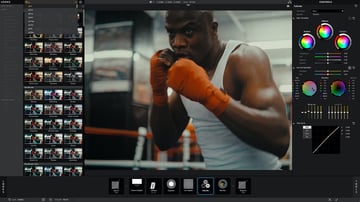
Price: A free trial and then a complicated pricing scheme with colour grading tools starting from $49.91 per month.
Red Giant’s Magic Bullet is a collection of colour correction, finishing, and film-look tools. It includes colour grading plug-ins that are also compatible with other popular video editing software. Their presets are based on popular looks of known movies and TV shows, and you can customise the result to suit your production.
Quick Look - Pros and Cons
Pros
-
High-quality film looks and presets.
-
Integration with popular editing software.
-
Easy to choose what you want based on popular ‘looks’ and then customise.
Cons
-
An elaborate and expensive pricing scheme that can soon mount up depending what you want.
5. MAGIX Video Pro X


Price: Free trial and then from £146 buy outright (currently on offer, usually £219).
MAGIX Video Pro X is professional video editing software that includes advanced colour grading tools. It caters to enthusiasts and professionals with tools for those who prefer to do everything themselves, plus easier to use creative items that can be applied in a few clicks.
Pros
-
Broad range of video editing capabilities.
-
Efficient workflow with intuitive interface.
Cons
-
Learning curve for beginners.
6. FilmConvert


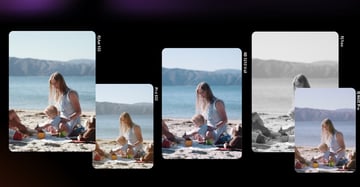
Price: Free trial and then from $119 per suite that you’d like to use it with, or $169 for all. These prices reflect the 20% offer currently available.
FilmConvert is slightly different in that its a plugin that fits with multiple editing suites to allow you to do extra colour grading styles – in this case, emulating colour palettes of popular TV shows and movies. It’s not just a set of downloadable LUTs, its software (with updates) in its own right, but it can be a cheaper alternative to buying something more comprehensive outright, particularly if you team it with DaVinci Resolve, which is free.
Compatible editing suites: Premiere Pro, After Effects, DaVinci Resolve, Final Cut Pro.
Quick Look - Pros and Cons
Pros
-
Easy-to-use
-
One-time purchase
-
Integrates with your regular editing software
Cons
-
Limited control over manual adjustments
-
If you do professional colour grading yourself, you probably wouldn’t use these
7. Lightworks


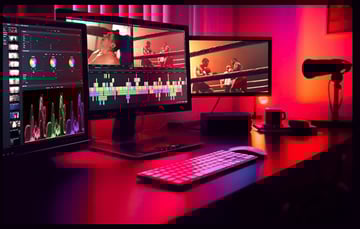
Price: Free base tier and then from £7.99 per month
It’s worth noting that Lightworks appears on a lot of free video colour grading software lists, and while its basic tier is actually free, it doesn’t include colour controls other than basic adjustments. Colour grading tools are only listed in its middle, £7.99, tier. Once you have access to those, you can use pre-built and custom LUTs, isolate and adjust colours and regions for targeted changes, and do all the usual colour grading stuff you’d expect!
Quick Look - Pros and Cons
Pros
-
Even the paid for options are affordable compared to the heavy hitters like Adobe.
-
Supports high-resolution and HDR workflows
-
Easy to use
Cons
-
Subscription only
-
Lacking in some pro features
Summary: Best Colour Grading Software or Colour Grading App/Plugin
Picking the perfect video colour grading software can be confusing when there’s a lot to choose from. Here are some of our recommendations based on what we’ve shown you.


For Professionals
-
DaVinci Resolve
There will never be a list that DaVinci Resolve won’t top when it comes to almost every aspect of video editing, but in particular with its colour grading tools. Not only is it designed for pros, but it’s free… free colour grading software! At the very least, give it a try. If you’re an Adobe user you might need some patience switching from a layer-based workflow to nodes, but you’ll get there.
For Streamlined Editors
-
Premiere Pro
If you're already knee deep in Adobe then the colour grading options in Premiere Pro are going to feel very familiar and instinctive to you, plus you can integrate with your existing workflow. More powerful grading might require venturing outside of Premiere Pro though, and the subscriptions to Adobe’s family of editing tools just keep increasing.


For Mac
-
Final Cut Pro
Final Cut Pro is a solid tool for video editing, including colour grading. FCP’s tools include area targeting for correction or grading, plus applying existing colouring quickly and easily to other clips, which can make your grading process faster and more efficient.
For Traditional 'Film Look' Movie Lovers
-
FilmConvert
If you love the retro look then FilmConvert’s plugin will fit with your existing suite to help you quickly create cinematic styles and tones. In as little as one click, their presets ‘copy’ popular movie and TV show styles. This is great if you’re happy with your existing editing setup but don’t feel confident enough to grade using its tools, or if you want new looks to complement your existing skills.


For No Frills Editing
-
Lightworks
Lightworks' free version has a reasonable offering but it doesn’t support colour grading. That said, its tier that does (£7.99) isn’t badly priced and you’ll find the tools give you a lot of control for primary and secondary correction, in an easy-to-use package.
A One-Stop Shop on a Budget
-
Magix Video Pro X
This is a sort of jack-of-all-trades editing suite with a decent set of colour grading tools alongside features like chroma keying, 3D editing, and video stabilisation. Its buy outright price of less than £200 is reasonable and won’t break the bank for video editors who are looking for a good all-rounder that’s still easy to use but has solid features.
A Few Things to Remember When it Comes to the Best Colour Grading Software
-
Consider your skill level, budget, and project requirements and fit the software to those.
-
Demo versions, free tiers, and tutorials can help you be sure the software you want is right for you, without paying anything.
-
Try combining programmes if you can’t find the perfect fit. For example you could use DaVinci Resolve (free video colour grading software, remember!) to edit and export, along with a plugin like FilmConvert to get easy, one-click styles.
-
Free colour grading software isn’t always free. Check to make sure that grading (and not just basic correction) is actually included in the tier you’re looking at.
Envato Elements
If you’re looking for some help with your film-making, give Envato Elements a try. You can find thousands of video resources for creators – including LUTs!- and download and use as much as you like for a monthly subscription.


Every month there are free files to take advantage of too!
Conclusion
Choosing the right colour grading software generally boils down to two things: what you need and what fits your budget. If you’re a professional film editor looking for comprehensive, industry-standard tools, then you might find DaVinci Resolve to be your best bet. If you’re a beginner, you might find something quick and simple to use like FilmConvert plugged into another suite will help you do your best grading.
More Colour Grading Articles and Tutorials

 The Ultimate Guide to Color Grading in Premiere Pro


 The Final Product: How to Finish a Grading Project in Resolve

 20 Top Color Grading Presets and LUTs for Premiere Pro (2024)


 How to Make a Custom LUT from Your Grade in Resolve

 How to Create Continuity of Feeling in Videos With Colour Grading in DaVinci Resolve

 What Is Color Grading? Learn Visual Storytelling for Video Post-Production

About This Page
This page was written by Marie Gardiner. Marie is a writer, author, and photographer. It was edited by Gonzalo Angulo. Gonzalo is an editor, writer and illustrator.
 By
By






