
 Lessons: 19Length: 2.6 hours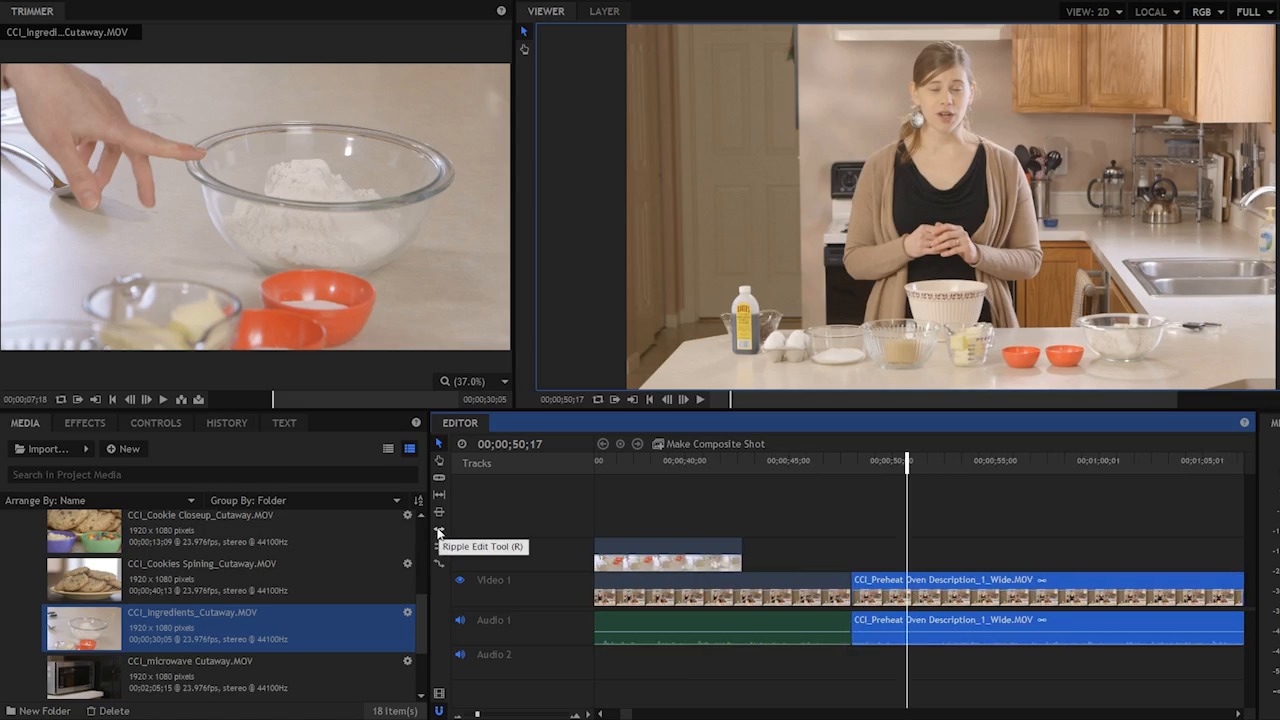
- Overview
- Transcript
4.6 Build on the Basic Edit
In this lesson you will see how to use the skills that you have learned so far to start building out the sequence.
1.Introduction
1.1Introduction01:10
1.2What You Need05:03
2.Getting Started
2.1File Structure09:39
2.2A Quick Tour of HitFilm09:30
2.3Import and Organize09:53
3.Set Up Your Project
3.1Proxies and Transcoding09:24
3.2What Is Video Editing?09:50
4.Editing Basics
4.1The First Cuts Are the Deepest10:02
4.2Add Clips to the Timeline07:37
4.3Refine the Edit, Part 110:20
4.4Refine the Edit, Part 208:51
4.5Add a Cutaway Shot08:19
4.6Build on the Basic Edit12:37
5.After the Edit
5.1Color Correct and Grade09:39
5.2Sweeten the Audio08:03
5.3Video Effects and Transitions08:53
5.4Export04:35
5.5Compression09:06
6.Conclusion
6.1Conclusion01:08
4.6 Build on the Basic Edit
In this lesson, you will see how to use the skills that you've learned so far to start building out the sequence. So let's continue to play on and see if there's another cutaway shot that we can add in here. >> Hi, my name is Cheryl Ziegler, and in this video, I'm going to show you how to make big, bakery-style chocolate chip cookies. First, let's go over the ingredients, you. >> Okay, so at the end of this clip here there's some weirdness, I'm not sure how that got there, but I do know I need to fix it. I'm going to grab the ripple edit tool and I'm just going to ripple this back right about there. I can tell on this audio blob here, that's just about the last thing that she said. I saw that there was too much dead space after that, so I'm just gonna ripple this down which is gonna bring everything else to the right here and it's gonna push it left to fill in that gap. So now let's see how it plays. >> Bakery style chocolate chip cookies. >> Oops, that was too far, so I'm gonna push it back a little bit. >> Style chocolate cookies, first let's. >> And I can tell here, I need to refine this a little bit. So, I think I'll grab the rolling edit tool, and I'm gonna move this edit point down a little bit, because on this clip here, there's a little too much weirdness at the beginning. There's kind of a funny breath and I'd like just a beat more at the end of this clip here. >> Chocolate chip cookies. First, let's go over the ingredient. >> That's not bad. So all I did is I moved the edit point down to the left a little bit. Again, I have another jump cut here that I need to deal with. Now, I do have this other cookie spinning clip here, so that seems like a good candidate. I'm going to find a good section here, where these cookies are spinning. Let's mark an in and a out point. And, I'm gonna hold alt, and add this to the timeline here. Now, I see I have added way too much, which is fine. So I'm just going to use the trim tool here and just trim it back. And I think I want to cut to this when she says big bakery style chocolate chip cookies. >> This video I'm going to show you how to make- >> So it's right here. I'm just going to trim that up. Right now I'm just going on timing, I don't know if the contents of this are right, so I'm gonna see if the clip fits first, and then adjust the contents of the clip because it's a bunch of cookies spinning, I know what's in this clip. So, let's see if this works. >> I'm going to show you how to make big bakery style chocolate chip cookies. First let's go over the. >> That's not bad. >> How to make big. >> Maybe I'd pull this so it comes just a hair quicker. >> I'm going to show you how to make big, bakery-style chocolate chip cookies. >> I could add a fade to that, maybe a dissolve or some kind of cross-fade, to bring this up nice and slow rather than just jump cutting to it, but I think it works okay for now. Let me keep playing and see what else we have here on the timeline. >> First lets go over the ingredients. You will need. >> So now we're looking at the ingredients and I do recall that there is an ingredient shot in the cutaway folder. And this is from another camera that was recording simultaneously. Now, if I wanted to cut between these two, I'm gonna have to line them up on the timeline here. Now it doesn't have to be super precise, but I'm gonna get this as close as possible. Now in some more advanced video editors, there are ways to synchronize multiple clips based on their audio or their time code. Hit Film does not have that option, but there's a pretty simple work around here, and I'm just gonna use the onscreen action to make it happen. As you can see here, Cheryl touches this bowl. So I'm going to use the comma and the period here to go frame by frame and find right when she touches the bowl. Bing! Right there. And then I'm going to come up here to the trimmer, and try and find the same spot, I'm gonna scrub here til I find it, and I am going to use the comma and the period keys to get to that same exact frame. So I am going to mark and end point right here and I am going to pull that down and snap it right here. Actually, I am going to hold alt because I don't need the audio. And so now I have these lined up fairly well. So when she's talking about these ingredients here, I have this second camera that's now synced up to the movement. >> First, let's go over the ingredients. >> So I think I'm probably going to cut to this right here. And I don't wanna move this forward or backward in time, cuz that's gonna mess up the alignment, and that's not super critical. But I am gonna leave it aligned for now. >> Two cups of all-purpose flour. >> Actually, I can probably cut to it later. >> Half a teaspoon of baking soda. >> Right about there seems good. >> Half a teaspoon of kosher salt. Three quarters of a cup of melted butter, one cup of packed brown sugar, half a cup of white sugar, one egg and one egg yoke, a tablespoon of vanilla extract, and two cups of chocolate chips. >> Okay, so most of that shot is good, up to the very end. A tablespoon of- >> Because it just looks, the motion is just a little bit too much, I think, so I may cut away from this right about here. >> One egg and one egg yolk, a tablespoon of vanilla extract and. >> Maybe a little bit sooner. >> One egg yolk, a tablespoon of vanilla extract, and two cups of chocolate chips. >> What I need to know is, if I need some kind of cut away shot here to cover my jump cut here between these two clips. I either need something on the back end of this clip, or the front end of this clip, to cover up this jump cut. >> Assembling the ingredients. Pre heat your oven to 300. >> Okay, so somehow, something happened here in a previous lesson, the timing got goofed up a little bit. No problem though. >> Assembling the. >> All right. So I just need to ripple edit this down to pick up the beginning of this line and that's right about here. >> Before you start. >> And I'm just gonna trim the end of this clip here, cuz there was just a little too much dead space. >> And two cups of chocolate chips. Before you start assembling the ingredients, preheat your oven to 325 degrees. >> So now we're doing preheating the oven, and hey, look at that! I have a preheating cutaway clip. So I'm just gonna scrub here, look what we have. Looks like we have two takes of this. Okay, so the first take didn't go very well, because she didn't hit 325. So let's look at the second take here. Good, all right, so I'm going to jump right here, hit I and I'm gonna use just that much of it. And hit O, and hold Alt down while I drag this on the timeline. And I'm gonna put this right at the beginning of the second clip here to cover up this jump cut again. So now I have this. >> Before your start assembling the ingredients, preheat your oven to 325 degrees. This temperature is a little bit lower than the standard 375 degrees. >> It ends at a weird spot, kind of in the middle of a sentence here so I either want to cut right here. >> 5 degrees. >> And then I'll cut back, or we'll hang on the shot until she's done with the next sentence. >> 375 degrees because we're making extra large cookies. >> And I think- >> 325 degrees. >> Probably right there. >> Before you start assembling the ingredients, pre-heat your oven to 325 degrees. This temperature is a little bit lower than the standard 375 degrees because we're making extra large. >> Maybe I'll use the slip tool here to just move this down a little more, so that at the beginning, we see her hand on it, and right at the end, we see her hand pull away. Before you start assembling the ingredients, preheat your oven to 325 degrees. This temperature is a little bit lower than the standard 375 degrees because we're making extra. >> And I think that works pretty well. So if I play on from here, let's see what we have. >> Temperature is a little bit lower than the standard 375 degrees, because we're making extra large cookies. So we wanna take the low and slow approach. We want the cookies to be perfectly baked on the outside and not extra brown, while the inside gets the perfect texture as well. >> I'm listening to this clip right here, and I think we could make a creative decision and delete this second phrase that she says. I like right here, where she says low and slow approach. >> Because we're making extra large cookies. So we want to take the low and slow approach. >> And then this second line that she says this second phrase here. It just didn't feel right. It kind of ended weakly. So I'm just going to delete it. Because I think this statement can stand on its own. I'm going to grab the ripple edit tool and just ripple that out. And that's going to move this final clip here that we had up on the timeline in every one is happy. >> Making extra large cookies, so we wanna take the low and slow approach. The next step is our butter. We're starting off here with 3/4 of a cup, which is the same as one and a half sticks. >> I can probably use this shot here of these cookies on the rack, this cookie closeup on the rack cut away as she's talking about the big cookies. >> Because we're making extra large cookies so we wanna take the low and slow approach. >> That makes sense to me. So, I'm gonna try and find a shot here. This is a hand held shot it looks like. That's not incredibly shaky, maybe this motion here. Do, do, do, do, do, do. Yeah, that looks pretty good. So I'm gonna mark an out point here. Just roll it back with the J key. Somewhere in here looks good. I and then I'm gonna hold alt because I only want the video portion. >> 25 degrees because we're making extra large cookies so we wanna take the low and slow approach. The next step is. >> Yeah, I think that works and. >> 25 degrees. >> I think we can start here, we're just gonna trim the beginning here, there's some movement here that changes speed so it starts kind of slow, and then it moves. And I think I can cut in here when the motion is already in progress. So I'm gonna switch back to the selection tool. I'm just gonna trim this. >> Five degrees, because we're- >> And maybe pull it back just a hair. >> Degrees because we're making extra large cookies so we wanna take the low and slow approach. The next step is our. >> Now I could make this a little shorter, then grab the rate stretch tool and just try and fake a little slow mo, because a slow mo clip would have been better here, but we didn't have a slow mo camera to shoot this with. But let's see what that looks like. >> Degrees because we're making extra large cookies. So we want to take the low and slow approach. Then. >> Yes I do like that better. I'm just going to check to see what the duration is. If this gets too far slowed down it's going to not look great. >> Making extra large cookies. So we want to take the low and slow approach. >> And that's pretty good for now. So the first portion of this edit is looking really nice. There are some more clips that you can play with and experiment with, but I really like the way this is looking right now. That doesn't mean that we're completely done because there are some more things to consider and that's what you are going to learn about in the next section of this course. In the next few lessons, you're gonna learn about color correction, grading, how to sweeten the audio, video effects and transitions, and more. So, check that out, coming up next.





